Clipboard shortcuts stop working
Windows expectation
Ctrl+C, Ctrl+V, and Ctrl+X are automatic.
Default macOS behavior
The same keys suddenly need Command instead of Control.
Windows muscle memory, restored on macOS
WinMode fixes keyboard shortcuts, navigation, and external keyboard behavior so Windows users feel instantly at home on macOS.
WinMode
Menu bar utility
Keyboard translation

Local keyboard remapping
No account, no cloud service, just Windows-style shortcuts on your Mac.
The problem
Switching to macOS should not mean relearning years of keyboard muscle memory. WinMode removes the most common friction points for Windows-first users and external keyboard setups.
Windows expectation
Ctrl+C, Ctrl+V, and Ctrl+X are automatic.
Default macOS behavior
The same keys suddenly need Command instead of Control.
Windows expectation
Home and End move to the start or end of the line.
Default macOS behavior
They often jump the page instead of the text cursor.
Windows expectation
Ctrl+Arrow jumps across words or text boundaries.
Default macOS behavior
The same habit produces different movement behavior.
WinMode applies the expected behavior automatically, locally, and without asking you to memorize a second keyboard language.
Features
WinMode focuses on the keyboard behaviors people notice immediately when they move from Windows to macOS.
Shortcuts
Translate familiar Control-based editing shortcuts into the native macOS equivalents while preserving app compatibility.
Navigation
Restore line and document navigation to match Windows expectations for fast editing in code, documents, and terminals.
Editing
Bring back predictable word-by-word cursor movement so text editing feels the same across platforms.
Hardware
Built for developers and professionals using external Windows keyboards on Mac laptops and desktops.
Runtime
Runs in the menu bar, launches at login, and stays out of the way once the one-time setup is complete.
How it works
The setup is intentionally small and explicit. After the initial permission step, WinMode runs quietly in the background.
Get the app package and open it from your Downloads folder.
Install it like a normal Mac utility so launch-at-login works cleanly.
WinMode starts from the menu bar and guides you through first-run setup.
This lets WinMode rewrite keyboard behavior locally on your machine. No cloud service is involved.
Screenshots
WinMode is a small menu bar utility, so the interface stays focused: setup, status, and quick controls.
Menu bar control
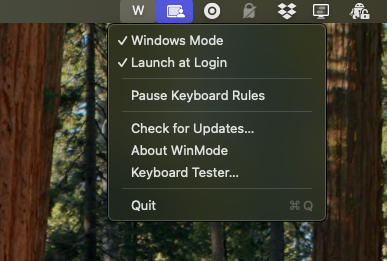
WinMode stays available from the macOS menu bar without adding a full preferences window.
Toggle Windows Mode, pause keyboard rules, check for updates, or quit from the menu bar.
Permission setup
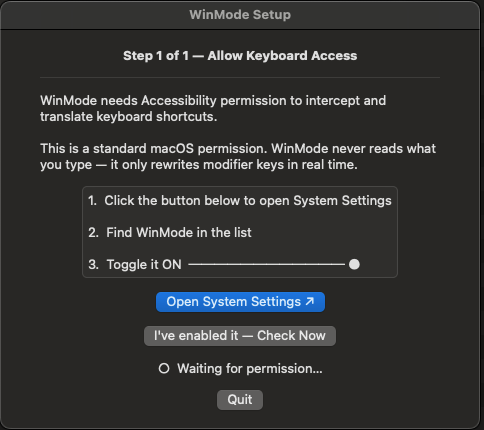
WinMode rewrites keyboard events locally, so macOS requires one explicit permission.
The first-run setup explains why Accessibility permission is needed before mappings turn on.
Keyboard mappings active
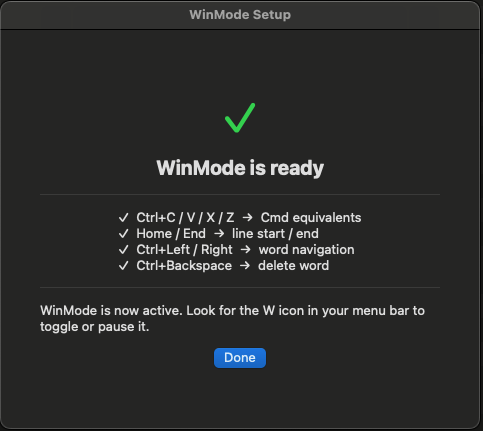
Core mappings include Ctrl+C/V/X/Z, Home and End, Ctrl+Arrow navigation, and Ctrl+Backspace.
Once setup is complete, WinMode applies Windows-style shortcuts and navigation in the background.
Pricing
Try it first. If it solves the problem, buy it once and keep it.
Included
WinMode is aimed at people who feel the keyboard friction immediately. The pricing stays as direct as the product.
FAQ
The product is intentionally small, so the answers are short: local-only behavior, clear compatibility limits, and one required macOS permission.
Yes. WinMode is especially useful with external Windows keyboards, but the core keyboard behavior fixes also work with Apple keyboards where the mappings make sense.
No. The app is designed as a local-only utility. It does not require a cloud account, and the website copy should reflect that no telemetry is part of the current product scope.
Yes. The current product plan targets both Intel and Apple Silicon Macs with macOS 12 Monterey or later.
Not for the core keyboard behavior. Internet access is not required for local shortcut and navigation remapping.
macOS requires Accessibility permission for apps that intercept and rewrite keyboard events. WinMode uses that permission only to apply your chosen keyboard behavior locally on your Mac.
Download
Built for people who want macOS to stop fighting familiar keyboard behavior. Install it, grant permission once, and get back to work.
macOS 12 or later
Apple Silicon and Intel supported
Current buttons point to on-page sections until the final download and checkout URLs are supplied.